
Choosing between analog and Internet Protocol (IP) security cameras comes down to how your business captures, sends, views, and analyzes video footage. Understanding these two camera types helps you avoid installation delays, control upgrade costs, and choose the right technology and hardware for your business.
Definitions: Analog vs IP Security Cameras
- Analog Security Camera (The Classic): An analog security camera is a surveillance device that captures raw video signals and transmits them unencrypted over coaxial cabling to a central Digital Video Recorder (DVR) for compression and storage.
- IP Security Camera (The Modern): An Internet Protocol (IP) security camera is a standalone digital video device that encodes, compresses, and encrypts video data internally, transmitting it over standard Ethernet cabling using Power over Ethernet (PoE) to a Network Video Recorder (NVR) or cloud management platform.
| Feature | Analog Security Cameras | IP Security Cameras |
| Video Resolution | Up to 4MP or 5MP (Standard definition to HD) (Similar to older TV feeds) |
1080p, 4K UHD, and multi-sensor panoramic (High definition) |
| Cabling Requirement |
Coaxial cable (RG59/RG6) | Ethernet cable (Cat5e/Cat6) |
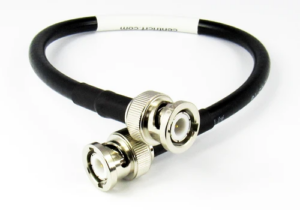
| Connector Type | Twist-lock metal BNC plug (Round metal knob that twists and locks) |
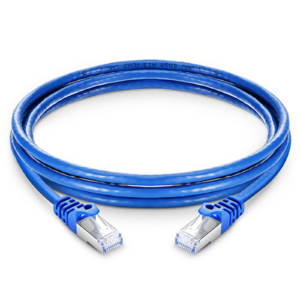
Snap-in plastic RJ45 connector (Clear plastic tab that snaps into place) |
| Power Supply | 12V DC / 24V AC (Separate power cable required) |
802.3af/at PoE standard via single Ethernet line |
| Recording Device | Digital Video Recorder (DVR) | Network Video Recorder (NVR) or Cloud Bridge |
| Signal Security | Unencrypted raw signal | Encrypted data packets at source |
| Remote Viewing | Viewable on store monitors or locally | Viewable from anywhere on mobile or browser apps |
| Bandwidth Load | 0 Mbps on local LAN (Direct coaxial line) | 2 Mbps to 8 Mbps per stream (H.264 / H.265 compressed) |
| Max Cable Distance |
1,000 feet (300 meters) without repeater | 328 feet (100 meters) per PoE switch drop |
For more information on security camera cables and wiring, check out: The complete guide to security camera cables and wiring types
How to Tell If a Security Camera Is Analog or IP
You can identify your current camera setup in seconds without pulling down equipment or reading technical manuals.
Identifying Cameras by Cable and Connector Type
Look behind your central recording cabinet or inspect the wiring near an overhead camera.
Analog cameras connect using thick coaxial cables, often labeled as RG59 or RG6. These wires terminate in a round metal connector called a BNC plug. You connect it by pushing the metal end onto the port and giving it a quarter-turn twist to lock it in place. Because coaxial cables only carry video signals, analog cameras always require a second power cord running alongside them.
IP cameras connect using standard Ethernet cables, labeled as Cat5e or Cat6. These cables terminate in a clear plastic plug called an RJ45 connector, which is identical to the wire you plug into an internet router. IP cameras use Power over Ethernet (PoE) technology. A single Ethernet cable delivers electricity to the camera while carrying digital video data back to your network.
How Analog and IP Cameras Process Video Signals
Analog cameras capture raw video images and send them directly through the coaxial cable to a central recorder box (a DVR). The DVR handles all the work of encoding the footage, compressing the file size, and saving it to a local hard drive.
IP cameras act like tiny onboard computers. Each camera converts, sharpens, and encrypts the video right inside the camera body before sending it across your store network to a Network Video Recorder (NVR) or cloud bridge.
What Are the Main Differences Between Analog vs IP Security Cameras?
Selecting the right hardware impacts daily manager tasks, image clarity during incident investigations, and store network stability.
Resolution and Digital Zoom Comparison
Clear video detail is essential when reviewing register transactions, drive-thru traffic, or safety incidents. Analog cameras top out at standard high-definition resolutions. Zooming in on a recorded analog video quickly causes the image to become pixelated and blurry.
IP cameras record in crisp 1080p, 4K, or multi-angle panoramic views. Because the digital image resolution is significantly higher, store managers can zoom in on recorded footage to clearly read cash values, order receipts, or license plates without losing image clarity.
Network Bandwidth Requirements for IP Cameras
Analog cameras transmit footage over physical coaxial cables directly to the DVR. They do not consume local area network (LAN) bandwidth unless an operator streams live footage remotely.
IP cameras send continuous digital data across your store network. High-resolution security cameras require steady network throughput. Running multiple 4K IP cameras without checking your network capacity can slow down back-office computers or point-of-sale terminals. Modern cloud video systems solve this by storing high-resolution video locally on a compact cloud bridge and streaming smaller compressed files when you watch live feeds on a mobile app.
Installation Complexity and Wiring Requirements
Installing new analog cameras requires running separate power lines and video cables for every single camera unit back to one central recorder box. This increases wiring costs and installation labor.
Installing IP cameras requires just one Ethernet cable per camera. If you add new security cameras to a location, technicians can plug the new lines into a nearby network switch rather than running long cables all the way across the building to the back office.
Selecting the Right System for Your Store Scenario
Determining the ideal hardware configuration depends on your current store infrastructure and operational goals.
- Single-Unit Retrofit on a Budget: Retain existing coaxial cabling, install a hybrid cloud bridge, and keep legacy analog cameras in place while adding high-definition IP units only at high-risk cash registers.
- New Store Construction or Remodel: Deploy Cat5e or Cat6 Ethernet cabling, Power over Ethernet switches, and native 4K IP cameras across all zones to maximize future flexibility.
- Multi-Unit Franchise Operations: Standardize on cloud-managed hybrid bridges to oversee legacy analog hardware and modern IP systems inside a single remote dashboard.
How to Upgrade Analog Security Cameras to Cloud Video
Upgrading store surveillance to modern cloud standards does not require replacing every existing camera and cable on day one. A phased retrofit keeps costs predictable and prevents store downtime.
- Audit your current setup: Inspect your recording box to count how many round metal BNC plugs and plastic RJ45 plugs you currently use.
- Unsure what cables you have? Snap a quick photo of the back of your recording box or camera cabling and email it to your Envysion account team. Our Solution Engineering team will inspect the connectors and validate your camera types for you before installation day.
- Install a hybrid cloud bridge: Connect an analog-to-digital converter or hybrid encoder to your existing coaxial cables. This translates your analog camera signals into digital data instantly.
- Keep existing wires in place: Run modern cloud video software using your current coaxial cables, avoiding the expense of pulling new wires through walls and ceilings.
- Replace security cameras in high-priority zones: Swap out critical analog units, like cash register and main entry cameras, for high-definition IP cameras first, leaving lower-risk areas on legacy units until future budget cycles.
Technical Glossary
- BNC Connector: Bayonet Neill–Concelman metal coupling used to attach coaxial video cables to analog recording hardware.
- PoE (Power over Ethernet): Network standard (IEEE 802.3af/at) that carries both electrical power and digital data across a single Ethernet wire.
- DVR (Digital Video Recorder): Hardware unit that receives raw analog video signals via coaxial cables, compressing and storing the data locally.
- NVR (Network Video Recorder): Dedicated network device that receives pre-compressed digital video streams over an Ethernet network for storage and remote management.
- Cloud Bridge / Encoder: Appliance that converts analog coaxial video feeds into encrypted digital streams, connecting legacy hardware directly to web platforms.
Frequently Asked Questions
How can I tell if my camera is analog or IP?
Look at the connector plug at the back of the camera or recorder. A round metal knob that twists to lock indicates an analog camera. A clear plastic clip that snaps in like an internet cord indicates an IP camera.
Can I connect old analog cameras to a cloud video app?
Yes. Hybrid encoders and cloud bridges plug directly into your existing coaxial cables. They convert raw analog video into secure digital streams so you can view all your store security cameras inside a modern cloud platform.
Will IP cameras slow down my store internet?
IP cameras use network bandwidth when streaming video offsite. You can avoid store slowdowns by using a hybrid video system that stores continuous footage locally on a bridge and only uses internet data when managers pull up live feeds or save incident clips.
Future-Proofing Your Store Surveillance Infrastructure
Selecting between analog vs IP security cameras does not require an all-or-nothing decision. Modern video management platforms allow franchise owners and enterprise operators to bridge legacy coaxial setups with high-definition network hardware. By auditing your store cabling today and deploying hybrid cloud bridges, you protect past infrastructure investments while gaining immediate access to centralized cloud oversight and operational analytics. Upgrading your surveillance system at your own pace keeps store locations secure, controls capital expenditure, and prepares your business for long-term growth.
Experience seamless cloud management across analog vs IP security cameras. See how Envysion integrates legacy setups and IP cameras into a single, intuitive dashboard. Schedule a demo with our video intelligence experts today.