
This guide shows you the best ways to clean your camera domes and covers. Following these steps will help you get the clearest pictures and keep your gear working great for a long time. Clear video ensures safety, helps with accountability, and keeps your security tech running smoothly.
Why Cleanliness Matters
The main goal is to get rid of grease, dust, dirt, and oily smudges without leaving any “swirl” scratches. If you don’t clean them correctly, you might run into these big problems:
- Blurry Video: Tiny scratches can scatter light and make your video look fuzzy.
- Permanent Scratches: Using the wrong cloth can actually damage the plastic or glass for good.
- Smart Feature Glitches: Features like motion alerts or AI person-detection can fail if the lens is smudged.
The “Never Use” List
Most camera damage happens because people use the wrong supplies for a “quick-fix”. Stay away from these:
Chemical Hazards
- Glass Cleaners (like Windex): These contain ammonia and harsh alcohols that “eat” into the plastic.
- Ammonia: This causes “clouding,” making the camera cover look foggy or milky permanently.
Abrasive Materials
- Paper Goods: Never use napkins, paper towels, or tissues. They feel soft to us, but they are actually very scratchy on a lens.
- Bar Rags or T-Shirts: Even clean-looking rags have tiny fibers that act like sandpaper.
- Why? These fabrics have tiny fibers that leave marks on the delicate surface.
Recommended Supplies
To keep your view crystal clear, stick to these safe materials:
- What to wash with: Just use a little mild dish soap and water, or a specialized lens cleaner.
- What to wipe with: Only use clean microfiber cloths or soft cotton flannel.
- Dealing with dust: Use an air blower or canned air to blow off loose dirt before you touch the lens.
Step-by-Step Cleaning Procedure
| Step | Action | Description |
| 1 | Dry Dusting | Use canned air to blow away loose dust. This prevents you from dragging grit across the lens when you wipe. |
| 2 | Soak (If Needed) | If there is heavy kitchen grease, using the “soak” method wet a cloth with warm soapy water and hold it on the lens for a minute to soften it up. |
| 3 | Gentle Wipe | Wipe gently in straight lines with a damp microfiber cloth. Don’t scrub or push down hard. |
| 4 | Final Polish | Finish with a dry microfiber cloth to remove water spots and tiny specs. |
The “Soak” Method (Step-by-Step)
- Wet your cloth: Take your clean microfiber cloth and get it very wet with warm, soapy water. It should be dripping slightly, but not pouring.
- Hold and press: Gently hold the wet cloth against the camera dome or lens. Do not rub yet! Just hold it there for 60 to 90 seconds.
- Let the water do the work: The goal is to let the moisture and soap penetrate the “crust” (like dried kitchen grease or salt crystals). This softens the debris so it becomes a liquid again.
- The “No-Pressure” Wipe: After a minute, use the weight of the cloth to gently wipe the area in one long, straight stroke.
Anti-Static Protection
Plastic camera housings often build up static, which acts like a magnet for dust.
- How to prevent it: Using an anti-static spray made for optics can keep dust away so you don’t have to clean as often.
- The Golden Rule: Never spray anything directly on the camera. Spray your cloth first, then wipe. This keeps liquid from leaking inside and shorting out the electronics.
Examples of Cleaning Damage
Check out these examples of cameras that were ruined by using the wrong tools, like paper towels or harsh cleaners.
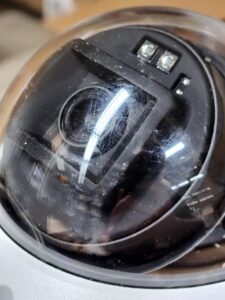
Notice how the scratches catch the light and make the whole image look blurry. This happens when someone uses a paper towel or a dirty rag. It catches light and blurs the whole image.
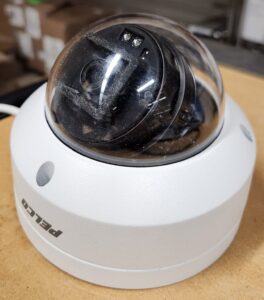
That “milky” look is what happens when ammonia-based cleaners eat away at the plastic.
Additional References
If you need more help with your specific camera model, check out these pages:
- Avigilon Unity Maintenance & Cleaning
- Pelco Support: Cleaning CCTV Cameras
- Avigilon Support: Cleaning Camera Domes
Coastal Locations: If your cameras are near the ocean, salt crystals will build up on the lens. You must soak them first, or the salt will act like glass shards when you wipe.
Terms of Use Disclaimer – The information provided in this article is intended to help guide customers on how to address situations that they may encounter with their products. Care has been taken to ensure the accuracy of the information on this site. Motorola Solutions Inc. and its affiliates and subsidiaries, including but not limited to Avigilon Corporation and Pelco Inc., assume no responsibility or liability for any errors or omissions in the content of this article, or any data or configuration loss that may result by employing this information, which is provided “as is” and “as available”, with no guarantees of completeness, accuracy, usefulness or timeliness. By using this article, you agree to these terms and conditions.